 OpenStreetMap

-mç-mç–çm-
Users' Diaries
Recent diary entries

So as I was mapping some rooftop solar, I noticed that some of the houses were all offset from the Bing image data by the same amount. I’m pretty sure there’s a way to resolve this without turning my GPS on and driving around a bunch, but where’s the fun in that? I also wanted to play around with Go Map!! and get comfortable with uploading traces in general, so I turned on Go Map!!’s GPS and drove around a bunch while listening to a podcast. Seeing the GPS data later on in JOSM was neat! It was also a reminder that GPS has a sampling frequency, and moving in a car, even at 25 miles per hour, spreads those samples out.
I’m guessing this is an imagery offset problem (I think that’s usually more likely to be incorrect), but I want to be sure so the solar panels are correct. I have to dig in some more. I know there are various ways to do it, but I’m entirely too sleepy to figure them out right now, which means it is officially a tomorrow thing. :)
Edit: I got a brief second wind. I learned that there is an imagery offset database, although neither of the two options available helped in this instance. I also noticed that both Bing and ESRI imagery comport, so the buildings are offset by the same amount compared to both images.
I checked the history of one of the buildings, and it was created in 2018 from Bing imagery. I then checked the buildings against ESRI Clarity, and they match much better. Now it’s officially a tomorrow thing. ;)

I started mapping my community last month. Looking at how the map is filling in, I think I’m about 1/4 to a 1/3 done with getting Fairview on the map. I’m focusing on homes, property boundaries, trees, pools and other out buildings.
Tonight I also worked on sidewalks and crossings.

Was a map user with Mapinfo for years at work, and added Google Earth Pro to that skill set. AllTrails uses OSM for their base map. Recommended by Carey Spies.
Enjoying the learning process so far. Have edited the course cart path at the Grizzly. And have added the path/driveway to Dale Spies’ house.
Posted by hobbesvsboyle on 10 December 2025 in English.
Last weekend I gave a talk about OpenStreetMap and biking at the Madison Bike Advocacy Meetup. This is a monthly meeting of people interested in biking and local bike advocacy. The purpose of the talk was to give a high-level overview of what OpenStreetMap is, how it can be used for biking and bike advocacy, and how you can contribute to OpenStreetMap. About two-thirds of the audience had previously heard about OSM. I think the talk was well received and there were many questions during the Q&A period. And in the days after the event I saw some OSM editing activity from new contributors.
The slides, notes, and resources are available in this Github repository under a CC BY-SA license. Please feel free to reuse it!
All mistakes and omissions are mine.
Posted by AlbaireN on 10 December 2025 in French (Français).

- Suivi des commerces (@karr4s)
-
Suivi des zones en travaux : requête à mettre à jour en fonction de la date + utilisation du tag
check_datedans OSM pour avoir un suivi des travaux - Suivi des vitesses limites

আজ আমি OpenStreetMap-এ নাগা বাজার ব্রিজের অবস্থান এবং নাম সংযোজন করেছি। নাগা বাজার ব্রিজ স্থানীয়ভাবে পরিচিত একটি গুরুত্বপূর্ণ সেতু, যা নাগা বাজার এবং আশেপাশের এলাকা সংযোগে ব্যবহৃত হয়। সেতুটি একটি প্রধান স্থানীয় রাস্তা পারাপারের জন্য ব্যবহৃত হয় এবং এলাকাবাসীর দৈনন্দিন জীবনে গুরুত্বপূর্ণ ভূমিকা রাখে।
আমি সঠিক অবস্থান নির্ধারণ করার জন্য স্থানীয় তথ্য ও GPS ব্যবহার করেছি। আশা করছি এই সংযোজন স্থানীয় মানচিত্রকে আরও তথ্যসমৃদ্ধ এবং ব্যবহারযোগ্য করবে।
Vadémécum de raccourcis JOSM :
- Tracer une ligne, sélection de l’ancienne zone puis Alt+X : découpe et crée une nouvelle zone
- Maj+J : Fusionner des zones
- Raccourci pour suivre rapidement les points
- W : crée une pseudo-ligne (appuyer Ctrl ou Alt ou Shift : ajoute des points)
- Ctrl pour aimanter deux points
- Ctrl+Maj : Rotation
- Ctrl+Alt Gr : Redimensionner
- G : Séparer deux chemins relier par un noeud
Posted by theorangetheme on 9 December 2025 in English.
Last updated on 10 December 2025.
I’m finding it difficult to pick a particular mapping task to focus on, because even in my corner of Orange, there seems to be so much to do. For example, I’ve noticed that the sidewalk ways sort of peter out a few blocks away from the Circle. I was glancing at some geometry last night, and also noticed that some people have tagged a few backyard swimming pools, but there are plenty of unmapped pools visible on imagery. I spent a little time adding some pools, as well as adding access=private tags the existing ones. It’s nice to have some stuff to do that doesn’t always involve going out somewhere (not that that would be feasible in people’s backyards anyway heh).
Then I noticed solar panels on aerial imagery, and wondered if anyone had tagged them. I know people tag larger power infrastructure, but mapping rooftop solar seems like it would be cool data to have, too, especially in Southern California, where it works particularly well. It’s also easy to do from imagery.
The neighborhood with the pools also has a decent amount of rooftop solar, so I mapped a few of those as well. I realized, though, after uploading a bunch (oops), that some of the panels aren’t necessarily photovoltaic cells; they could be rooftop water heating, especially smaller areas that look particularly black. I plan to go back through and try to verify if they really are rooftop solar. Most probably are, and most of them look distinctive or big enough that I’d be confident in tagging them as rooftop photovoltaic cells, but a few of them could also be rooftop water heating, so I might just remove the photovoltaic-specific tags from them for now. It’s still rooftop solar, but the particular energy use will just be ambiguous. I think that’s better than it being incorrect.
Focus!
I need to pick a few things to focus on and them see them through to completion, I think. I have a bad habit of starting projects and not finishing them. In no particular order, I’d like to map:

J’ai créé mon salon sur BigBlueButton, le lien se trouve ici: @HugoC01

RETEX: Encounters Along My Mapping Walks
(translation by ChatGpt)
to be continued, maybe:
- journal entry (upcoming): Existential Questions About My Encounter with Panoramax
- journal entry (upcoming): Existential Questions About OSM and the Wikimedia World
- journal entry (upcoming): My First Experiences With an RTK Rover and an RTK Base
My urban recycling trek is now complete (at least regarding the attempt to map all voluntary drop-off points in the GPS&O intercommunality). I still need to clear up some fixme tags. This journal entry isn’t about mapping information but simply about a few encounters I had during my walks. They are just brief flashes of emotion, smiles, or frustration.
To understand the atmosphere of these encounters, picture me as:
- 70 years old, usually in shorts (except below 11°C)
- with a backpack (20L)
- always carrying at least one hiking pole in one hand and a camera in the other
- sometimes with a pole sticking out of my backpack holding a GNSS antenna at head height
The Best of the Best: Hunting for AEDs
in a micro-crèche
2025-09-08 in Médan I’m looking for a micro-daycare facility to verify the presence of an AED (Osmose suggestion). I wander a bit around the assumed location at the end of a residential cul-de-sac and eventually identify the daycare. I hesitate to enter the garden and ring the doorbell when an educator opens a ground-floor window, leans out, and asks whether I’m looking for something and if she can help (a polite way of saying “we’re watching, please move along”).
We exchange a couple of rather friendly minutes during which I silently give up on asking whether I may come in to photograph the AED (didn’t seem very wise). Instead, I hand her my phone and ask if she can photograph the AED on their wall (at least we both know she will avoid putting any children in the frame).
Posted by oldnab on 9 December 2025 in French (Français).
RETEX : Rencontres au fil des randonnées cartographiques
à suivre peut-être :
- entrée de journal (à venir) : Questions existentielles sur ma rencontre avec panoramax
- entrée de journal (à venir) : Questions existentielles sur OSM et le monde Wikimédia
- entrée de journal (à venir) : Mes premières expériences de rover RTK et de base RTK
Mon trekking urbain recyclage est maintenant fini (en ce qui concerne la tentative de cartographie de tous les points d’apport volontaire de l’intercommunalité GPS&O.). Il me reste à régler certains fixme.
Cette entrée de journal ne concerne pas des informations cartographiques mais simplement quelques rencontres que j’ai faites au cours de mes marches. Il s’agit juste de brefs éclats d’émotion, de sourire ou de colère.
Pour comprendre l’ambiance de ces rencontres, il faut m’imaginer :
- 70 ans, en short en général (sauf en dessous de 11 degrés Celsius)
- avec un sac à dos (20l)
- toujours au moins un bâton de marche dans une main et un appareil photo dans l’autre.
- parfois une canne sortant du sac à dos et portant (à hauteur de ma tête) une antenne GNSS
Le must : la recherche des DAE
dans une microcrèche
2025-09-08 à Médan
Je cherche une micro-crèche pour vérifier l’existence d’un DAE (suggestion Osmose). Je tourne un peu autour du lieu supposé au bout d’une impasse résidentielle et finis par identifier la crèche. J’hésite à entrer dans le jardin et à sonner à la porte lorsqu’une animatrice ouvre une fenêtre (rez-de-chaussée), se penche à l’extérieur et me demande si je cherche quelque chose et si elle peut m’aider (façon de me dire “nous sommes vigilantes, passez votre chemin”).
It was a lovely day outside today. I added some fire hydrants along East Almond, and also adjusted the crossing at Almond and Center, which I believe must’ve been edited based on out-of-date aerial imagery. The previous nodes and ways specified unmarked, uncontrolled intersections for all but one crossing, which matches the existing Bing imagery. I walk through this area all the time, though, and the city installed more stop signs and painted the remaining three crossings with yellow ladder crosswalks some months back. So, I’ve updated the map to reflect this.
Some of the hydrants along (or just off of) Almond were Clow hydrants, as I’ve seen before, but instead of a more recognizable model number, these all just read “5” underneath “Clow”. A quick search didn’t turn up any “Clow 5” hydrants, although it is, admittedly, hard to Google, and I was outside on my phone when I searched.
That being said, I did another quick search just now on my computer, and I found a PDF that mentions a “Clow #5” hydrant. Mystery solved! I tagged these as “model: 5” at the time, so there’s nothing to do!
Posted by Raquel Dezidério Souto on 9 December 2025 in English.

Do you know how to map access points to the beach?
Check out the tagging scheme that we have developed for mapping access to beaches and other coastal recreational areas
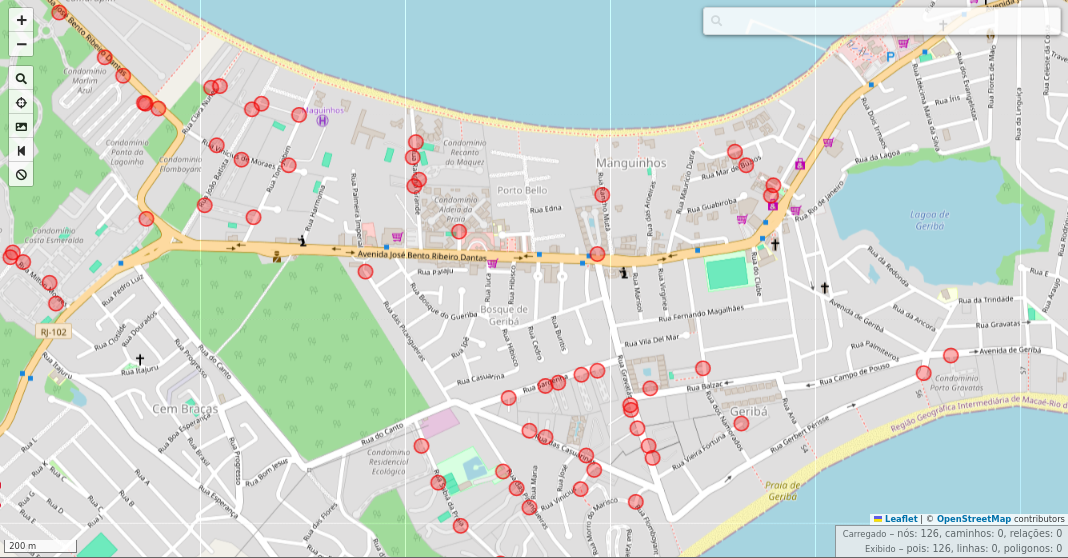
Manguinhos Bay, Armação dos Búzios, Rio de Janeiro, Brazil, viewed in the overpass turbo, filtering tag barrier=gate (red). Mapa data © OpenStreetMap contributors, Nov. 15, 2025.
Collaborative mapping of beach access with OpenStreetMap
I participated as a Keynote Speaker in the II Beach Access Network (BAN) Research Workshop, held between August 18 and 20, 2025, at Casa da Ciência, Rio de Janeiro (Brazil), and showed how to map beach access points with OpenStreetMap. Now you can read the text about the tagging scheme and some details of this mapping.
Download the text
New development completed and occupied.
Consists of:
1 - 7 Norman Close, ST. ALBANS, AL1 2DW
1 - 5 King Offa Terrace, Wallingford Walk, ST. ALBANS, AL1 2EL
18A - 18B Abbots Avenue West, ST. ALBANS, AL1 2EJ

While I mapped driveways years ago in my neighborhood, I didn’t include access tags. I saw that later someone added access=private tags, and I thought nothing of it assuming it was the correct tag. So now when I just mapped scores of them in the neighborhood additions, I just now had the thought to look on the wiki for the tag definition.
As said by the wiki, the definition of access=private:
Public access is not allowed. Access is granted with individual permission only. Examples: A driveway with a no trespassing or keep out sign; A company parking lot for employees only. “Individual permission” has been interpreted to also include delivery people making a delivery to a resident or drivers picking up a resident by request.
Most of that makes sense - but in the examples, why would it specify a driveway would need a “No Trespassing” or a “Keep Out” sign? Just wondering if I need to retag some driveways in line with common (or changing) practice, or at least having more confidence in tagging them correctly.

地震があったね 震度6強 12月9日
قمت بتعديل جديد وقمت بإزالة بعض الأماكن التي بالفعل تم نقلها إلى مكان آخر ولا يوجد تغيير في الخريطه هل تأخذ وقت طويل في تنزيل بيانات الجديده؟ كل ما اتطلع اليه هو تقديم بيانات دقيقه فقط للمستخدمين
Posted by theorangetheme on 7 December 2025 in English.
Last updated on 9 December 2025.
Not much to report today. I stopped by Play Coffee with a friend and added some POI tags while we were in line. There’s always something to map if you have a little downtime!
I also discovered that the building Cali Tacos is in has no POIs to speak of, so I’ll focus on adding those next, along with ever more fire hydrants. (I found some possibly interesting information about Van Deventer fire hydrants, but I’m not sure it’s enough to answer the question firehydrant.org posed about whether or not it was a company or just a licensed design.) In fact, the geometry on the map just shows one singular building, which is true, but there are individual units for each business. I think it makes sense to break them up, I just need to make sure I’m doing it correctly.
Using a phone running Android OS as a data collector for an RTK-enabled GNSS receiver, I ran into a fairly small but annoying inconvenience with getting data files from it on a Windows machine.
On Windows, you can’t mount a phone’s file system as an actual removable drive (don’t confuse that with seeing its file system in the File Explorer), so automating it with built-in command-line file tools isn’t an option. File paths to the data folders of Android apps are ridiculously long, so traversing them manually is another hassle.
However, it’s still possible to do that using the Android Debug Bridge tool, a part of the SDK Platform Tools.
After installing SDK Platform Tools, you should be able to use the adb command in PowerShell or classic Command Prompt batch files.
Knowing the full path to a folder where your data collector app (LocusGIS, SW Maps, etc.) stores files you need to download regularly, you can get a list of that folder’s contents by calling adb shell ls command with the full path to that folder as a parameter.
Downloading a file is as easy as calling adb pull with the full path to the file you want to download. This process can be made more or less interactive if you create a script that lists all the folder contents, then prompts you for a name, and then downloads the file by the name you entered. The target file name or path can also be specified as another parameter. It’s even easier if the data collector app uses the same filename every time, or if you save it under the same name.
For all that to work, you’d have to enable USB debugging on your mobile device and grant permission for the Windows machine to use it when you first attempt to utilize the adb. However, it would save you the hassle of switching on the File Transfer mode every time you want to access the phone’s file system.